
NRx has supported pharmacies for decades, and we’re grateful for the trust you’ve placed in us. As technology and regulatory requirements continue to evolve, NRx can no longer meet the standards required to support your pharmacy. To ensure you continue operating effectively with the best tools available, NRx will be retired and customers will be able to transition to a modern RedSail pharmacy management system.
Get Your Migration Date
NRx customers will migrate in waves. Enter your CustomerID to look up your exact migration date.
Please use the search feature above, check your email, or contact Customer Success for your pharmacy's migration deadline.
As regulations and innovation accelerate, the aging NRx architecture is no longer equipped to support upcoming industry standards—most notably the new NCPDP SCRIPT requirements for e-prescribing. Continuing to operate on NRx would limit your ability to maintain compliance and deliver the level of patient care you expect.
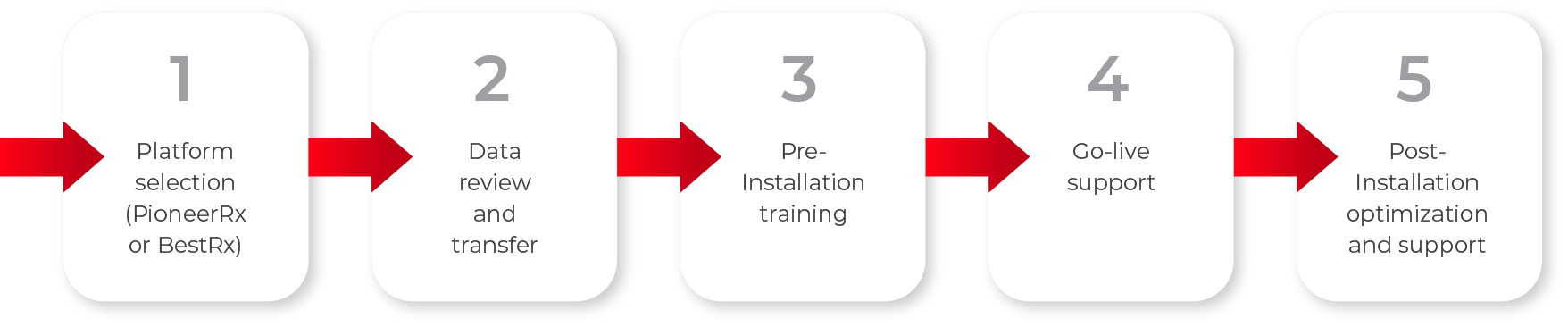
Transitioning to a modern, fully supported platform ensures your pharmacy benefits from:


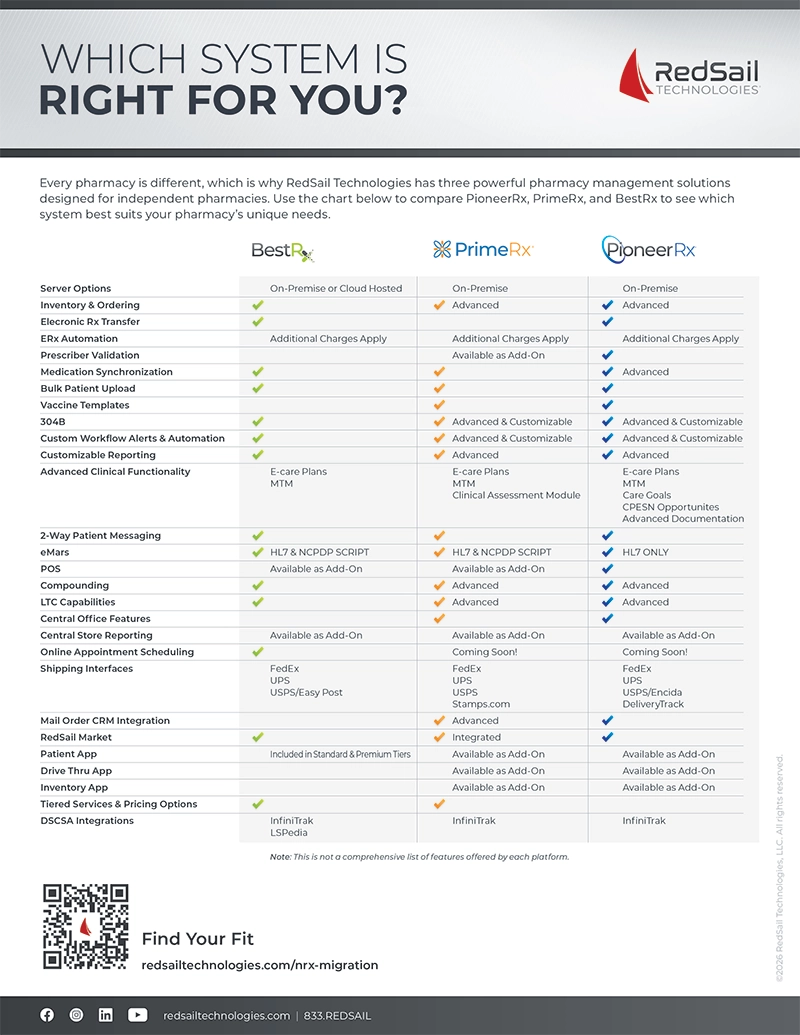
We encourage you to transition to one of RedSail’s industry-leading pharmacy management systems: PioneerRx, BestRx, or PrimeRx. All platforms offer robust capabilities and can be tailored to your pharmacy’s unique needs.

Designed for independent community pharmacies that want a feature-rich, highly customizable system with advanced clinical and business management tools.
Clinically Advanced: Support value-based care with integrated eCare Plans, CPESN workflows, clinical documentation, and advanced integrations.
Smart Automation: Tailor workflows, dashboards, and reporting processes to get insights when and where you need them.
Built for Complexity: Handle multi-service, multi-location, and complex pharmacy operations with precision.

An intuitive PMS designed for startup or single-location pharmacies. Built with easy-to-use workflows, dispensing-focused features, and cost-effective pricing tiers that keep you in control.
Efficiency Focused: Increase productivity, speed up dispensing, and support growing script volume with streamlined workflows.
Easy to Use: Get up and running quickly with easy onboarding, user-friendly interfaces, and features that just make sense.
Cost Effective: Maximize value without sacrificing quality.

A flexible PMS built for pharmacies ready for what's next. Operational visibility, advanced business tools, and scalable workflows that support every stage of growth.
Built for Growth: Scale from a single location to a multi-store operation with a system designed to go with you.
Highly Customizable: Configure workflows, automation, and controls to run your pharmacy your way.
Better Business Intelligence: Make more informed decisions with advanced reporting, inventory management, and day-to-day operational insights.



On-Premise or Cloud Hosted
On-Premise
On-Premise


Advanced

Advanced
Additional Charges Apply
Additional Charges Apply
Additional Charges Apply
Available as Add-On
Advanced
Advanced & Customizable
Advanced & Customizable
Advanced & Customizable
Advanced & Customizable
E-Care Plans
MTM
E-Care Plans
Care Goals
Clinical Assessment Module
E-Care Plans
MTM
Care Goals
CPESN Opportunities
Advanced Documentation
HL7 & NCPDP SCRIPT
HL7 & NCPDP SCRIPT
HL7 Only
Available as Add-On
Available as Add-On
Advanced
Advanced
Advanced
Advanced
Available as Add-On
Available as Add-On
Available as Add-On
Coming Soon!
Coming Soon!
FedEx
UPS
USPS/EasyPost
FedEx
UPS
USPS
Stamps.com
FedEx
UPS
USPS/Endicia
DeliveryTrack
Advanced
Integrated
Included in Standard & Premium Tiers
Available as Add-On
Available as Add-On
Available as Add-On
Available as Add-On
Available as Add-On
Available as Add-On
InfiniTrak
LSPedia
InfiniTrak
InfiniTrak