Pharmacists' to-do lists aren’t getting shorter. Especially in community pharmacies where pharmacists are often the most accessible healthcare professional—providing patient care and education every day requires time, energy, and resources, often with minimal to no reimbursement.
As a pharmacy technology provider, RedSail recently launched a free tool for our retail pharmacy management system (PMS) users—PioneerRx, BestRx, PrimeRx, and QS/1—to support pharmacists in identifying potential gaps in patient education, adherence, and affordability.
Enter Clinical+.
As Nicole Pezzino, PharmD, Director of Clinical and Technical Services, describes it, “Clinical+ is designed to support the work pharmacists are already doing, by identifying the right patients at the right time, sharing resources that complement existing care, and creating opportunities for revenue.”
Think of Clinical+ as a pharmacist’s automated assistant. As a pharmacy staff member moves through their PMS workflow, Clinical+ reviews data and flags potential untapped patient engagement opportunities and when appropriate, triggers prompts or delivers relevant resources to patients at the right time. And if you choose to complete the suggested action, your pharmacy can receive invoice credits for eligible programs (amount varies per program/campaign).
Pharmacies can access Clinical+ settings through its portal, where all programs and their specific triggers are stored. Each program has a specific, targeted goal relevant to patient education, adherence, or affordability. Utilizing the patient data stored within the PMS, Clinical+ launches campaigns based on the campaign’s relevant data. And yes, this is all optional—each pharmacy can turn triggers on or off at any time.
Additionally, the auto send feature in Clinical+ helps reduce workflow disruptions. It's enabled for campaigns/programs that directly inform and provide resources to patients. With auto send, although no action is required from pharmacy staff, you can still earn invoice credits. As with other program settings, auto send can be toggled on/off in the Clinical+ portal.
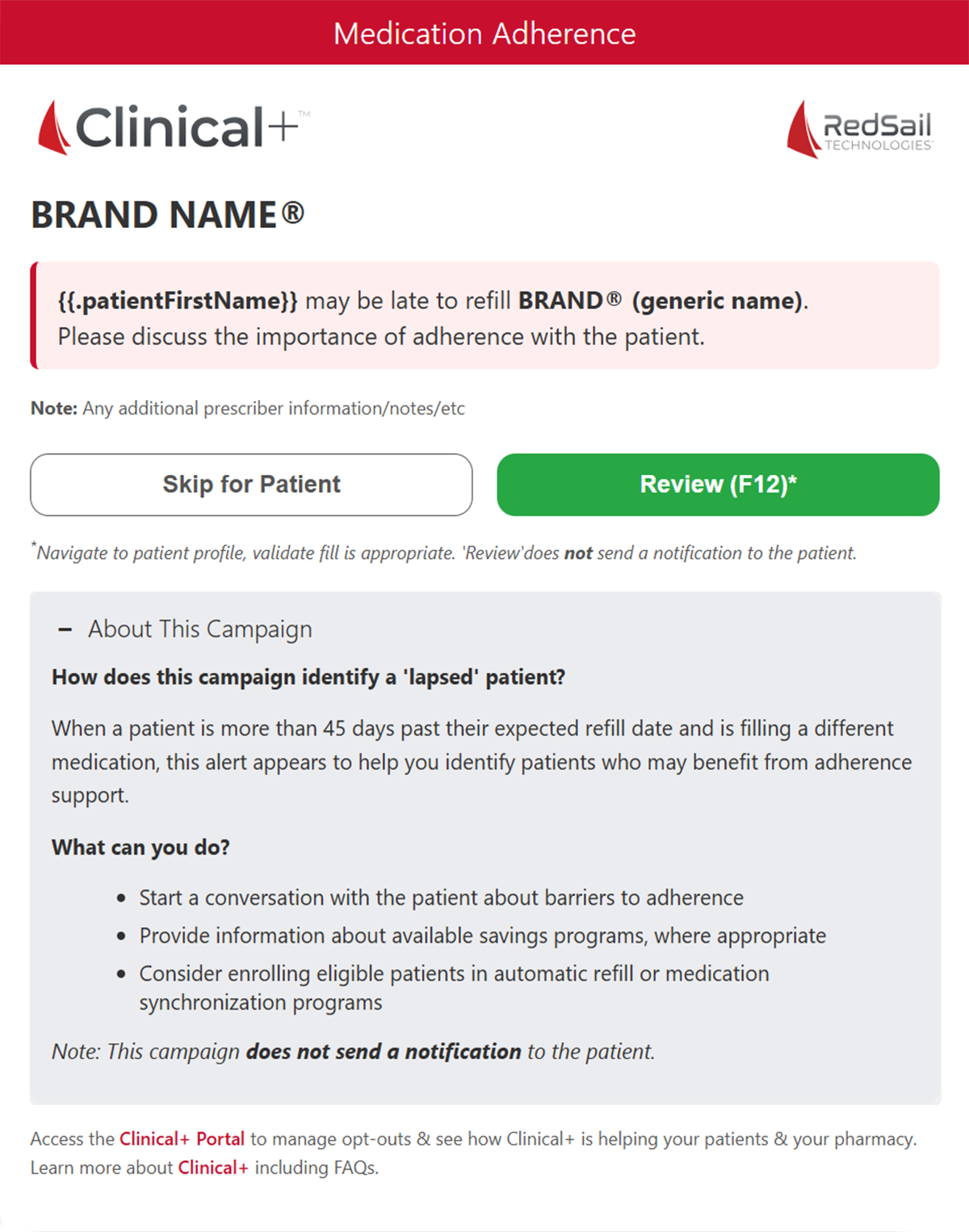
A pharmacist is at their check station, verifying prescriptions. While verifying for medication A, the pharmacist gets prompted that the patient has lapsed on medication B. The pharmacist decides to have an in-person conversation—and sends the alert to the point-of-sale station.
That same patient enters the pharmacy to pick up medication A. The patient heads to the counter, and the pharmacy staff pulls up the patient in their PMS to complete the check-out process. At this point, an in-workflow alert pops up in the PMS, courtesy of Clinical+. The pop up indicates a potential adherence gap for the patient for the different medication recorded in their file.
The staff member can review the prompt, which explains why the patient was flagged, what they were flagged for, and the suggestions for how to engage. In addition, there are often patient education revenue credits available to the pharmacy for completing the prompt.
The staff member can either select “Review” and engage the patient, or determine the prompt is not appropriate and select “Skip for Patient.” The regular point-of-sale process continues as usual.
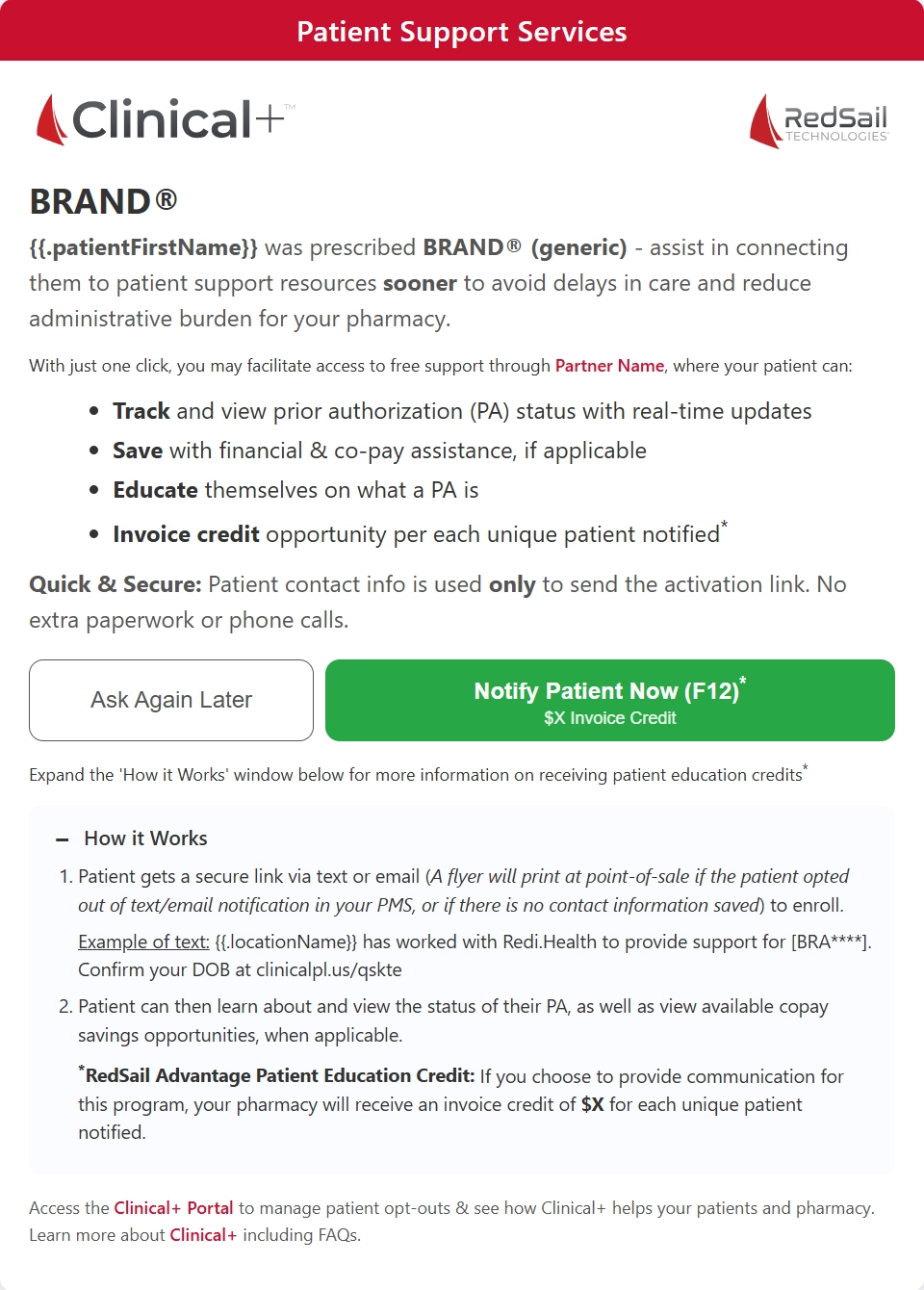
A pharmacy staff member is processing an Rx for a brand name medication. The medication requires a prior authorization and the pharmacy staff member places the Rx on hold. Clinical+ identifies a partner that offers support resources for this therapy, such as prior authorization tracking and potential financial or copay assistance.
The staff member can review the alert to see details about the available support. If it’s relevant, they can select “Notify Patient Now (F12),” which sends a message to the patient via text or email. The communication lets the patient know their pharmacy is supporting them during the prior authorization process—by connecting them to tools that help them to stay informed about what a prior authorization is and the status, to access potential savings, and to learn more about their medication. All of this happens in the background, allowing the pharmacist or technician to continue their workflow. Plus, the pharmacy is eligible for renumeration for sharing the resources.
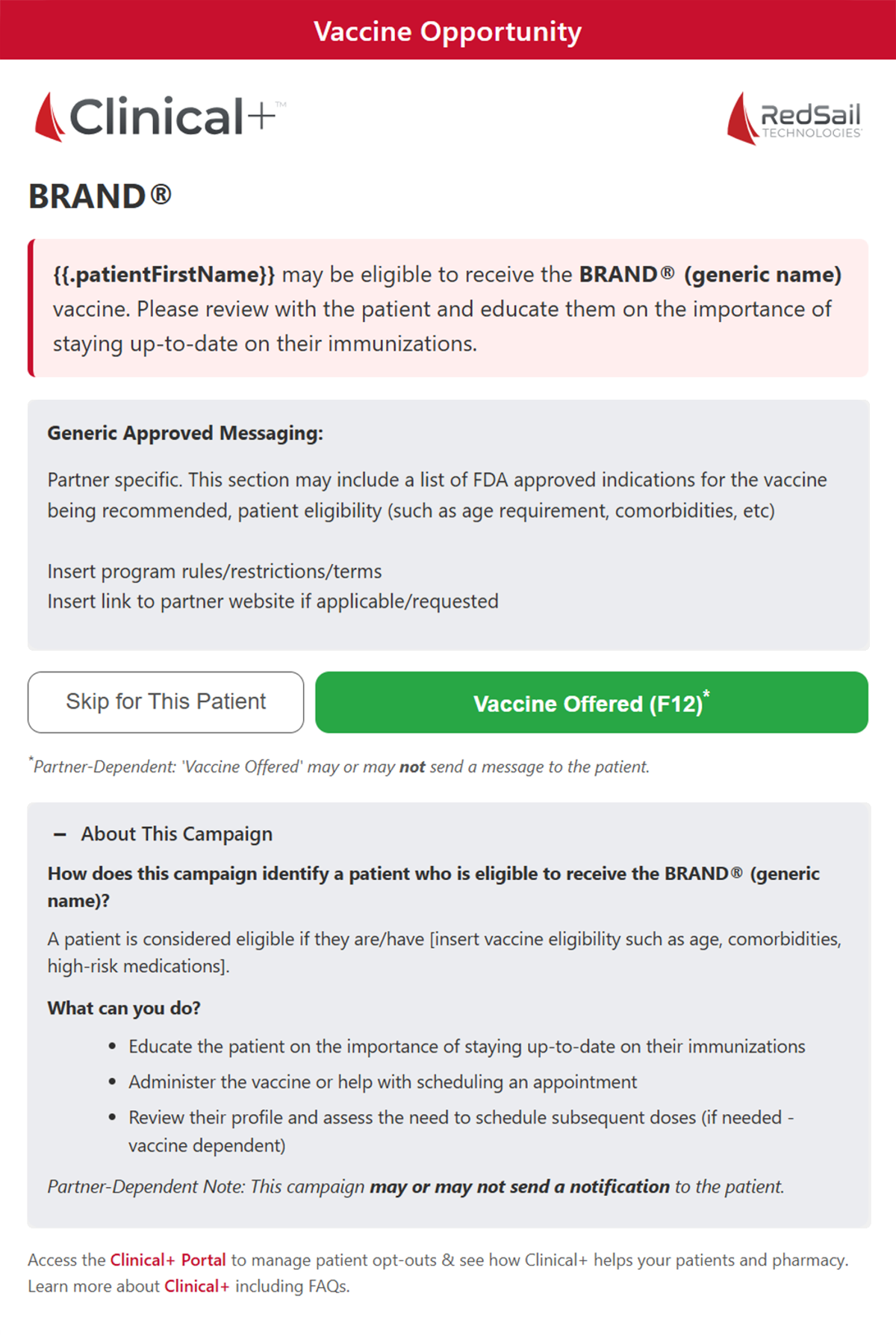
A patient is at the counter picking up their medications. As the staff member checks out the patient, an alert appears indicating the patient may be eligible for a shingles vaccine based on age and available vaccination history.
The prompt will suggest offering a vaccine while in-store or referring them to the pharmacy’s scheduling process. In addition, the prompt will offer digital or printed materials to combat any vaccine hesitancy.
Again, the pharmacist can either choose to complete the prompt or ignore and continue with the check-out process.
Clinical+ puts pharmacies in the driver's seat. It serves as an additional resource that helps surface relevant opportunities while respecting the patient care and education already happening in pharmacy. The utilization of each program is at the discretion of the pharmacy and their pharmacist-in-charge. Through the Clinical+ portal, each pharmacy can review all available alerts and turn them on and off as needed.
Pro tip: Along with manufacturer-sponsored campaigns, Clinical+ includes an always-growing roster of programs that alert your staff and patients to helpful OTC products based on specific clinical criteria. For example, targeted prompts will recommend products to help manage hypoglycemia, B12 repletion, or probiotics depending on a patient’s medication profile. Participating pharmacies can see dozens to hundreds of additional OTC transactions due to a Clinical+ recommendation.
Simply login to the portal to view available campaigns, their details, and the on/off switch. The portal also allows the pharmacy to opt-out patients for any messaging per their request and easily manage multi-location pharmacy preferences. In addition, dashboards for program results detail lifetime credits, credits accrued versus total possible, unique patients supported, and total missed revenue.
The goal of Clinical+ is to help patients start, stay, and succeed on their therapies—while helping pharmacies drive better business outcomes. It does this by connecting patients with timely support and relevant resources, while reinforcing the pharmacist’s role in meaningful patient engagement.
Questions? Check out the Clinical+ FAQs or reach out to ClinicalPlus@redsailtechnologies.com for additional details.